With Praise you can easily pull reviews posted on Yelp by your happy customers directly into your testimonials section. This is done by connecting to your Yelp profile and importing the reviews you like.
The connect to your Yelp profile please do the following:
- Open the settings panel
- Hit the "Manage testimonials" button in the "Main tab"
- Switch to "Yelp" tab located on the left hand side
- Enter the URL address of your Yelp profile and hit Connect
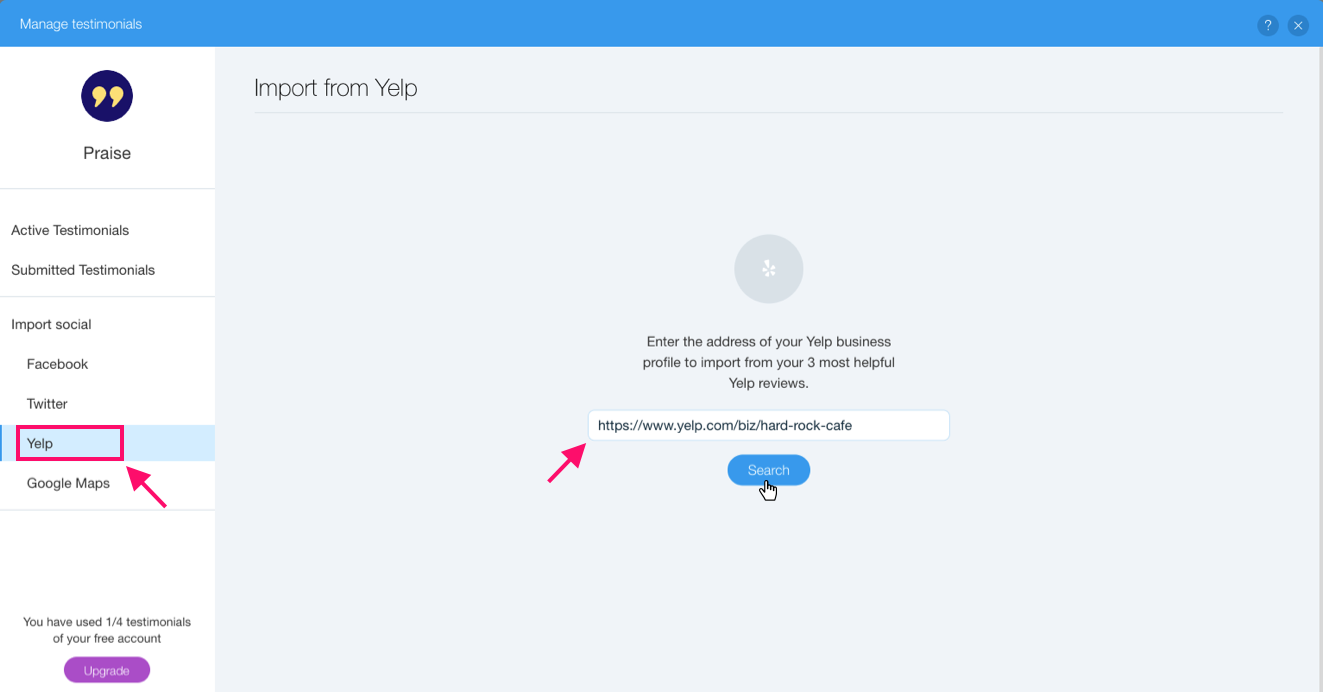
To find address of your Yelp profile simply find your Yelp profile page and copy the URL from the address bar. The address should look similar to the following:
https://www.yelp.com/biz/my-business-name
Once you have connected to your Yelp profile the list of reviews should appear. Please note that Yelp only returns up to 3 reviews sorted by Yelp's default sort order.
Hit "Import" on the review you'd like to display and we'll create a testimonial with details pulled from Yelp. We'll also automatically link the testimonial back to the original review to add credibility to your testimonials section.
You might notice that after you hit the "Import" button it is replaced with a green check mark - this mark will appear on each testimonial that was already imported into your app.
Comments
0 comments
Please sign in to leave a comment.