With Praise you can easily connect to your business Facebook page and pull posts and reviews from your happy customers directly into your testimonials section.
To connect to Facebook:
- Open the settings panel
- Hit the "Manage testimonials" button in the "Main tab"
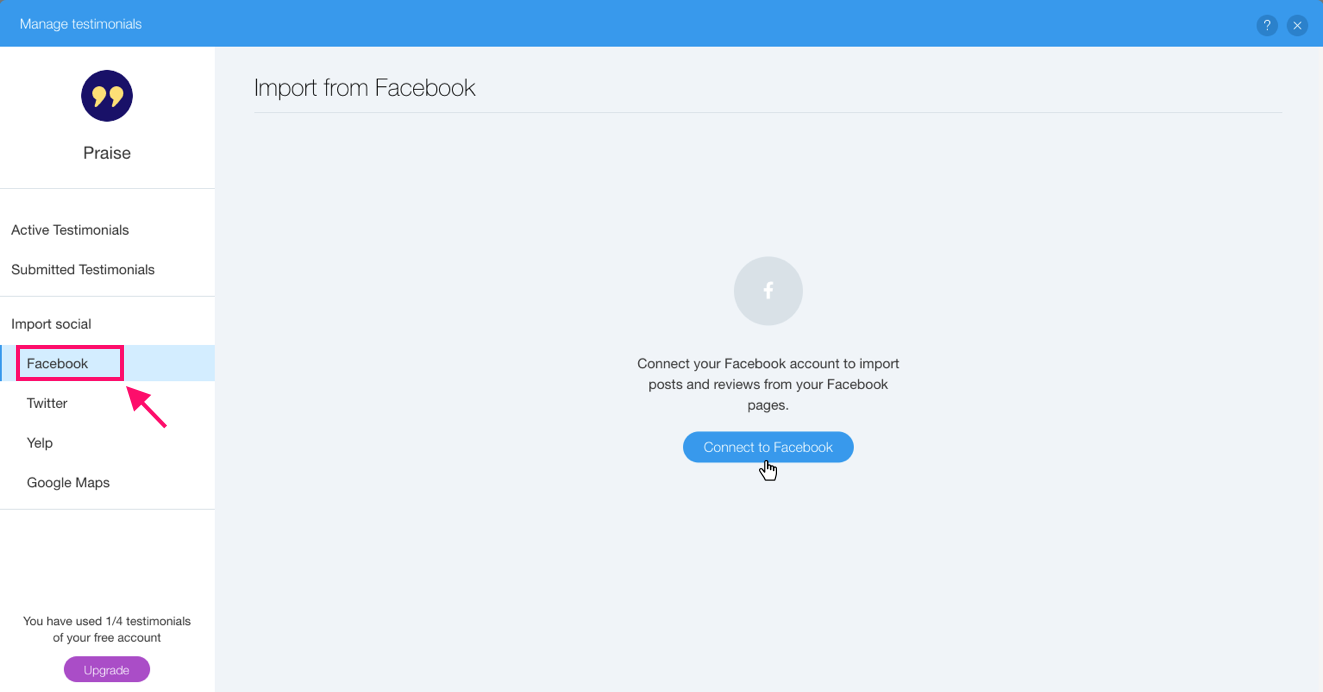
- Switch to "Facebook" tab located on the left hand side
- Click "Connect to Facebook" and complete the authorization process
Once the Facebook account is connected you should see a drop-down with a list of all the Facebook pages under your administration. Choose the correct page and a list of the posts and reviews of that page will appear below the drop-down.
Hit "Import" on the post you'd like to display and we'll create a testimonial with details pulled from Facebook. We'll also automatically link the testimonial back to the original post to add credibility to your testimonials section.
You might notice that after you hit the "Import" button it is replaced with a green check mark - this mark will appear on each testimonial that was already imported into your app.
Comments
1 comment
i am having a problem, it do not seems to allow import from 2018 and older.
Please sign in to leave a comment.