With Praise customers can submit their testimonials directly from your website. Once this feature is enabled, a button will be added to the testimonials section which brings up a testimonials form. After the form is submitted, you will receive an email notification about the new submission.
The submitted testimonials are only published after they have been reviewed and approved. This can be done either from Praise management panel inside the editor or directly through the notification email.
Enable submit button
- Open the settings panel
- Switch to the "Form" tab
- Turn on the "Enable submit button" toggle switch. The button should immediately appear next to your testimonials section.
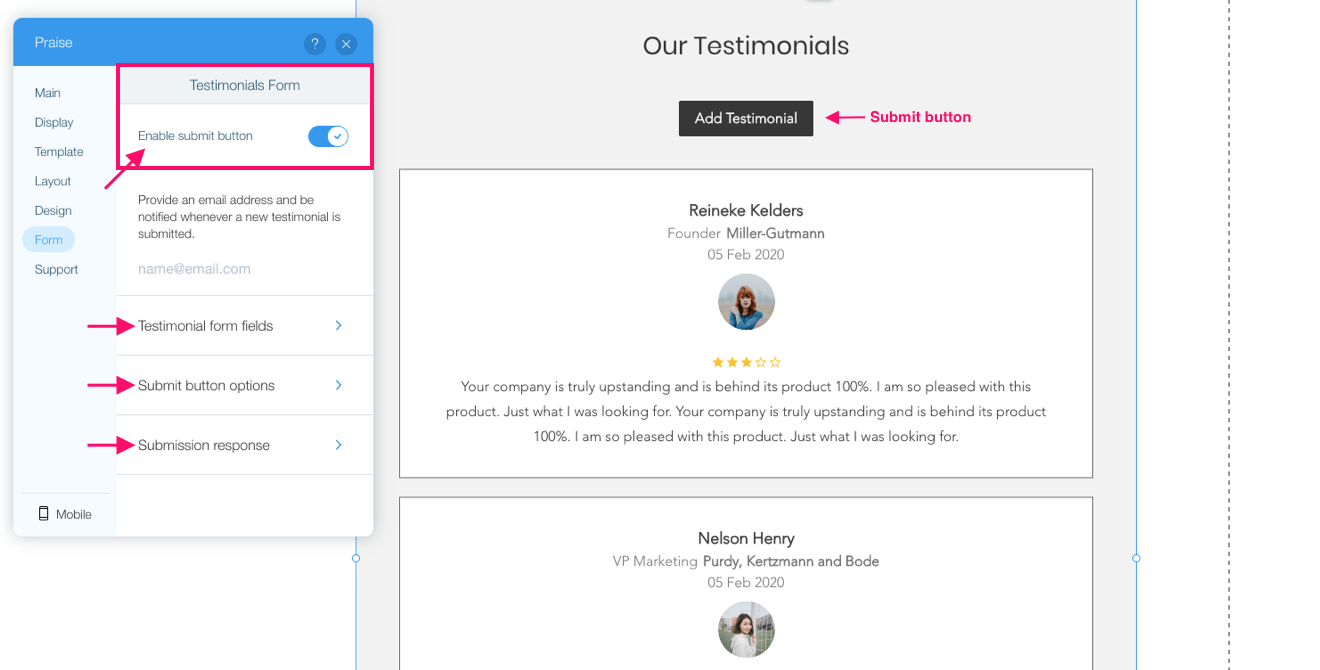
The following additional configuration sub-tabs are available:
- Button options sub-tab allows choosing the label of the submit button, its position and design style.
- Form fields sub-tab allows choosing which fields will be displayed in the form. Customer email, customer name and testimonial text are mandatory and can not be removed.
- Confirmation message sub-tab allows customizing what will be displayed after the form is submitted.
Comments
0 comments
Please sign in to leave a comment.